

Section 6.7: Histograms
- Page ID
- 216507

\( \newcommand{\vecs}[1]{\overset { \scriptstyle \rightharpoonup} {\mathbf{#1}} } \)
\( \newcommand{\vecd}[1]{\overset{-\!-\!\rightharpoonup}{\vphantom{a}\smash {#1}}} \)
\( \newcommand{\dsum}{\displaystyle\sum\limits} \)
\( \newcommand{\dint}{\displaystyle\int\limits} \)
\( \newcommand{\dlim}{\displaystyle\lim\limits} \)
\( \newcommand{\id}{\mathrm{id}}\) \( \newcommand{\Span}{\mathrm{span}}\)
( \newcommand{\kernel}{\mathrm{null}\,}\) \( \newcommand{\range}{\mathrm{range}\,}\)
\( \newcommand{\RealPart}{\mathrm{Re}}\) \( \newcommand{\ImaginaryPart}{\mathrm{Im}}\)
\( \newcommand{\Argument}{\mathrm{Arg}}\) \( \newcommand{\norm}[1]{\| #1 \|}\)
\( \newcommand{\inner}[2]{\langle #1, #2 \rangle}\)
\( \newcommand{\Span}{\mathrm{span}}\)
\( \newcommand{\id}{\mathrm{id}}\)
\( \newcommand{\Span}{\mathrm{span}}\)
\( \newcommand{\kernel}{\mathrm{null}\,}\)
\( \newcommand{\range}{\mathrm{range}\,}\)
\( \newcommand{\RealPart}{\mathrm{Re}}\)
\( \newcommand{\ImaginaryPart}{\mathrm{Im}}\)
\( \newcommand{\Argument}{\mathrm{Arg}}\)
\( \newcommand{\norm}[1]{\| #1 \|}\)
\( \newcommand{\inner}[2]{\langle #1, #2 \rangle}\)
\( \newcommand{\Span}{\mathrm{span}}\) \( \newcommand{\AA}{\unicode[.8,0]{x212B}}\)
\( \newcommand{\vectorA}[1]{\vec{#1}} % arrow\)
\( \newcommand{\vectorAt}[1]{\vec{\text{#1}}} % arrow\)
\( \newcommand{\vectorB}[1]{\overset { \scriptstyle \rightharpoonup} {\mathbf{#1}} } \)
\( \newcommand{\vectorC}[1]{\textbf{#1}} \)
\( \newcommand{\vectorD}[1]{\overrightarrow{#1}} \)
\( \newcommand{\vectorDt}[1]{\overrightarrow{\text{#1}}} \)
\( \newcommand{\vectE}[1]{\overset{-\!-\!\rightharpoonup}{\vphantom{a}\smash{\mathbf {#1}}}} \)
\( \newcommand{\vecs}[1]{\overset { \scriptstyle \rightharpoonup} {\mathbf{#1}} } \)
\(\newcommand{\longvect}{\overrightarrow}\)
\( \newcommand{\vecd}[1]{\overset{-\!-\!\rightharpoonup}{\vphantom{a}\smash {#1}}} \)
\(\newcommand{\avec}{\mathbf a}\) \(\newcommand{\bvec}{\mathbf b}\) \(\newcommand{\cvec}{\mathbf c}\) \(\newcommand{\dvec}{\mathbf d}\) \(\newcommand{\dtil}{\widetilde{\mathbf d}}\) \(\newcommand{\evec}{\mathbf e}\) \(\newcommand{\fvec}{\mathbf f}\) \(\newcommand{\nvec}{\mathbf n}\) \(\newcommand{\pvec}{\mathbf p}\) \(\newcommand{\qvec}{\mathbf q}\) \(\newcommand{\svec}{\mathbf s}\) \(\newcommand{\tvec}{\mathbf t}\) \(\newcommand{\uvec}{\mathbf u}\) \(\newcommand{\vvec}{\mathbf v}\) \(\newcommand{\wvec}{\mathbf w}\) \(\newcommand{\xvec}{\mathbf x}\) \(\newcommand{\yvec}{\mathbf y}\) \(\newcommand{\zvec}{\mathbf z}\) \(\newcommand{\rvec}{\mathbf r}\) \(\newcommand{\mvec}{\mathbf m}\) \(\newcommand{\zerovec}{\mathbf 0}\) \(\newcommand{\onevec}{\mathbf 1}\) \(\newcommand{\real}{\mathbb R}\) \(\newcommand{\twovec}[2]{\left[\begin{array}{r}#1 \\ #2 \end{array}\right]}\) \(\newcommand{\ctwovec}[2]{\left[\begin{array}{c}#1 \\ #2 \end{array}\right]}\) \(\newcommand{\threevec}[3]{\left[\begin{array}{r}#1 \\ #2 \\ #3 \end{array}\right]}\) \(\newcommand{\cthreevec}[3]{\left[\begin{array}{c}#1 \\ #2 \\ #3 \end{array}\right]}\) \(\newcommand{\fourvec}[4]{\left[\begin{array}{r}#1 \\ #2 \\ #3 \\ #4 \end{array}\right]}\) \(\newcommand{\cfourvec}[4]{\left[\begin{array}{c}#1 \\ #2 \\ #3 \\ #4 \end{array}\right]}\) \(\newcommand{\fivevec}[5]{\left[\begin{array}{r}#1 \\ #2 \\ #3 \\ #4 \\ #5 \\ \end{array}\right]}\) \(\newcommand{\cfivevec}[5]{\left[\begin{array}{c}#1 \\ #2 \\ #3 \\ #4 \\ #5 \\ \end{array}\right]}\) \(\newcommand{\mattwo}[4]{\left[\begin{array}{rr}#1 \amp #2 \\ #3 \amp #4 \\ \end{array}\right]}\) \(\newcommand{\laspan}[1]{\text{Span}\{#1\}}\) \(\newcommand{\bcal}{\cal B}\) \(\newcommand{\ccal}{\cal C}\) \(\newcommand{\scal}{\cal S}\) \(\newcommand{\wcal}{\cal W}\) \(\newcommand{\ecal}{\cal E}\) \(\newcommand{\coords}[2]{\left\{#1\right\}_{#2}}\) \(\newcommand{\gray}[1]{\color{gray}{#1}}\) \(\newcommand{\lgray}[1]{\color{lightgray}{#1}}\) \(\newcommand{\rank}{\operatorname{rank}}\) \(\newcommand{\row}{\text{Row}}\) \(\newcommand{\col}{\text{Col}}\) \(\renewcommand{\row}{\text{Row}}\) \(\newcommand{\nul}{\text{Nul}}\) \(\newcommand{\var}{\text{Var}}\) \(\newcommand{\corr}{\text{corr}}\) \(\newcommand{\len}[1]{\left|#1\right|}\) \(\newcommand{\bbar}{\overline{\bvec}}\) \(\newcommand{\bhat}{\widehat{\bvec}}\) \(\newcommand{\bperp}{\bvec^\perp}\) \(\newcommand{\xhat}{\widehat{\xvec}}\) \(\newcommand{\vhat}{\widehat{\vvec}}\) \(\newcommand{\uhat}{\widehat{\uvec}}\) \(\newcommand{\what}{\widehat{\wvec}}\) \(\newcommand{\Sighat}{\widehat{\Sigma}}\) \(\newcommand{\lt}{<}\) \(\newcommand{\gt}{>}\) \(\newcommand{\amp}{&}\) \(\definecolor{fillinmathshade}{gray}{0.9}\)
- Draw a histogram for a data set
A histogram is a graphical display that shows the distribution of numerical data by dividing the data into intervals (called classes or bins) and displaying the frequency of observations in each interval as bars. Unlike bar graphs, histograms display continuous numerical data, and the bars touch each other to emphasize the continuous nature of the data. Histograms are essential tools for understanding the shape, center, and spread of a data distribution.
When to Use Histograms
Histograms are most effective when you want to:
- Display the distribution of continuous numerical data
- Show the shape of a data distribution
- Identify patterns such as symmetry, skewness, or uniformity
- See where data values are concentrated
- Identify gaps, clusters, or outliers in the data
- Understand the spread or variability of data
- Compare frequency distributions visually
Key Components of a Histogram
- Horizontal Axis (x-axis): Shows the numerical scale divided into class intervals (bins)
- Represents the variable being measured (height, test scores, age, temperature, etc.)
- Divided into equal-width intervals
- Vertical Axis (y-axis): Shows the frequency (count) or relative frequency (percentage) of observations in each interval
- Bars (Rectangles): Each bar represents one class interval
- Height shows the frequency for that interval
- Width represents the class interval
- Bars touch each other (no spaces) to show continuous data
- Class Intervals (Bins): The ranges into which data is divided
- Should have equal width
- Should cover all data values
- Typically use 5-20 intervals depending on data size
- Labels and Title: Clear axis labels and descriptive title
Advantages of Histograms
- Shows distribution shape: Immediately reveals if data is symmetric, skewed, uniform, or bimodal
- Identifies patterns: Clusters, gaps, and outliers become visible
- Easy to construct and interpret: Simple visual representation
- Shows central tendency: Where data concentrates
- Reveals spread: Shows how variable or consistent the data is
- Handles large datasets: Can summarize hundreds or thousands of observations
- Foundation for statistical analysis: Helps check assumptions for further analysis
Limitations of Histograms
- Loses individual data values: Grouping obscures specific observations
- Sensitive to bin width: Different bin widths can create different impressions
- Sensitive to bin boundaries: Starting/ending points affect appearance
- Less precise than raw data: Can't calculate exact statistics from histogram alone
- Requires numerical data: Won't work with categorical data
- Can be misleading: Poor choices in bins or scale can distort interpretation
- Step 1 — Obtain the data in a frequency distribution table.
- Step 2 — Draw the histogram.
- Draw the axes: Draw a horizontal line for the x-axis and a vertical line for the y-axis.
- Label the axes: Label the horizontal axis with your chosen class width or bin intervals and the vertical axis with a frequency scale that accommodates your highest count.
- Draw the bars: For each class/bin, draw a vertical bar with a height corresponding to its frequency. The bars should have the exact same width and should touch each other to show the continuous nature of the data.
- Step 3 — Add a title, if necessary.
Two Types of Frequency Histograms
- Ungrouped frequency histograms - Used for either qualitative data (categorical data) or single value data
- Grouped frequency histograms - Used for quantitative data (numerical data) where the data needs to be grouped into class intervals.
Let's see several examples for both types of frequency histograms.
The number of text messages sent in one hour by 20 teenagers is given below in a frequency distribution table:
| Number of Texts | Frequency |
|---|---|
| 1 | 3 |
| 2 | 1 |
| 3 | 0 |
| 4 | 3 |
| 5 | 2 |
| 6 | 5 |
| 7 | 1 |
| 8 | 2 |
| 9 | 3 |
Draw an ungrouped frequency histogram for the data set.
✅ Solution:
- Step 1 — Obtain the data in a frequency distribution table: Here, the frequency distribution was given.
- Step 2 — Draw the histogram:
- Draw the axes: Draw a horizontal line for the x-axis and a vertical line for the y-axis.
- Label the axes: Label the horizontal axis with your chosen class width or bin intervals and the vertical axis with a frequency scale that accommodates your highest count. So, since the data is ungrouped, the first bin is labeled 1 and represents all data values that are equal to 1. The second bin is labeled 2 and represents all data values that are equal to 2. And so on, and so on.
- Draw the bars: For each class/bin, draw a vertical bar with a height corresponding to its frequency. The bars should have the exact same width and should touch each other to show the continuous nature of the data.
- Step 3 — Add a title, if necessary: Add the title, "Text Messaging by Students" or some other similar title.

The histogram titled “Text Messaging by Students” displays the frequency of the number of text messages sent by students. The x-axis is labeled “Number of Texts,” and the y-axis is labeled “Frequency,” ranging from 0 to 6. The value 1 has a frequency of 3 students. The value 2 has a frequency of 1. The value 3 has a frequency of 0, meaning no students sent 3 texts. The value 4 has a frequency of 3. The value 5 has a frequency of 2. The value 6 has the highest frequency with 5 students. The value 7 has a frequency of 1. The value 8 has a frequency of 2. The value 9 has a frequency of 3. Overall, the histogram shows that 6 text messages is the most common value, while 3 text messages does not appear in the data set.
The frequency distribution for twenty-five overall ratings from 1 through 10 of an exclusive Paramount Plus show is given below:
| Ratings | Frequency |
|---|---|
| 1 | 2 |
| 2 | 3 |
| 3 | 6 |
| 4 | 4 |
| 5 | 3 |
| 6 | 2 |
| 7 | 2 |
| 8 | 2 |
| 9 | 1 |
| 10 | 0 |
Draw an ungrouped frequency histogram for the data set.
✅ Solution:
- Step 1 — Obtain the data in a frequency distribution table: Here, the frequency distribution was given.
- Step 2 — Draw the histogram:
- Draw the axes: Draw a horizontal line for the x-axis and a vertical line for the y-axis.
- Label the axes: Label the horizontal axis with your chosen class width or bin intervals and the vertical axis with a frequency scale that accommodates your highest count. So, since the data is ungrouped, the first bin is labeled 1 and represents all data values that are equal to 1. The second bin is labeled 2 and represents all data values that are equal to 2. And so on, and so on.
- Draw the bars: For each class/bin, draw a vertical bar with a height corresponding to its frequency. The bars should have the exact same width and should touch each other to show the continuous nature of the data.
- Step 3 — Add a title, if necessary: Add the title, "Ratings for an Exclusive Paramount Plus Show" or some other similar title.

The histogram titled “Ratings for an Exclusive Paramount Plus Show” displays the frequency of viewer ratings on a scale from 1 to 10. The x-axis is labeled “Rating,” and the y-axis is labeled “Frequency,” ranging from 0 to 7. A rating of 1 has a frequency of 2. A rating of 2 has a frequency of 3. A rating of 3 has the highest frequency with 6 responses. A rating of 4 has a frequency of 4. A rating of 5 has a frequency of 3. Ratings of 6, 7, and 8 each have a frequency of 2. A rating of 9 has a frequency of 1. A rating of 10 has a frequency of 0, meaning no viewers gave the show a perfect rating. Overall, the histogram shows that lower-to-middle ratings, especially 3 and 4, were the most common, while very high ratings were less frequent.
The heights (in inches) of 28 adult males is recorded.
64, 65, 66, 66, 67, 67, 68, 68, 68, 69, 69, 69, 70, 70,
70, 71, 71, 71, 72, 72, 72, 73, 73, 73, 74, 74, 75, 76
Draw an ungrouped frequency histogram for the data set.
✅ Solution:
- Step 1 — Obtain the data in a frequency distribution table: A frequency distribution for the data set is given below.
| Heights | Frequency |
|---|---|
| 64 | 1 |
| 65 | 1 |
| 66 | 2 |
| 67 | 2 |
| 68 | 3 |
| 69 | 3 |
| 70 | 3 |
| 71 | 3 |
| 72 | 3 |
| 73 | 3 |
| 74 | 2 |
| 75 | 1 |
| 76 | 1 |
- Step 2 — Draw the histogram:
- Draw the axes: Draw a horizontal line for the x-axis and a vertical line for the y-axis.
- Label the axes: Label the horizontal axis with your chosen class width or bin intervals and the vertical axis with a frequency scale that accommodates your highest count. So, since the data is ungrouped, the first bin is labeled 64 and represents all data values that are equal to 64. The second bin is labeled 65 and represents all data values that are equal to 65. And so on, and so on.
- Draw the bars: For each class/bin, draw a vertical bar with a height corresponding to its frequency. The bars should have the exact same width and should touch each other to show the continuous nature of the data.
- Step 3 — Add a title, if necessary: Add the title, "Text Messaging by Students" or some other similar title.

The histogram titled “Adult Male Heights” displays the frequency of adult male heights measured in inches. The x-axis is labeled “Heights (in inches)” and ranges from 64 to 76 inches. The y-axis is labeled “Frequency” and ranges from 0 to 4. A height of 64 inches has a frequency of 1. A height of 65 inches has a frequency of 1. Heights of 66 and 67 inches each have a frequency of 2. Heights from 68 through 73 inches each have the highest frequency of 3. A height of 74 inches has a frequency of 2. Heights of 75 and 76 inches each have a frequency of 1. Overall, the histogram shows that most adult male heights are clustered between 68 and 73 inches, with fewer individuals at the shorter and taller extremes.
The temperatures (in degrees Fahrenheit) recorded in 20 cities on a particular day, rounded to the nearest degree are listed below:
58, 68, 65, 79, 51, 94, 64, 80, 69, 113, 63, 70, 102, 70, 92, 87, 77, 64, 64, 72
Here is the grouped frequency distribution for the above data using a class width of 11 and a starting point of 51.
| Temperature | Frequency |
|---|---|
| 51—61 | 2 |
| 62—72 | 10 |
| 73—83 | 3 |
| 84—94 | 3 |
| 95—105 | 1 |
| 106—116 | 1 |
Draw an grouped frequency histogram for the data set.
✅ Solution:
- Step 1 — Obtain the data in a frequency distribution table: Here, the frequency distribution was given.
- Step 2 — Draw the histogram:
- Draw the axes: Draw a horizontal line for the x-axis and a vertical line for the y-axis.
- Label the axes: Label the horizontal axis with your chosen class width or bin intervals and the vertical axis with a frequency scale that accommodates your highest count. So, since the data is grouped, the first bin is labeled 51—61 and represents all data values that are between 51 and 61 inclusive. The second bin is labeled 62—72 and represents all data values that are between 62 and 72 inclusive. The third bin is labeled 73—83 and represents all data values that are between 73 and 83 inclusive. And so on, and so on.
- Draw the bars: For each class/bin, draw a vertical bar with a height corresponding to its frequency. The bars should have the exact same width and should touch each other to show the continuous nature of the data.
- Step 3 — Add a title, if necessary: Add the title, "Temperatures of 20 Cities" or some other similar title.
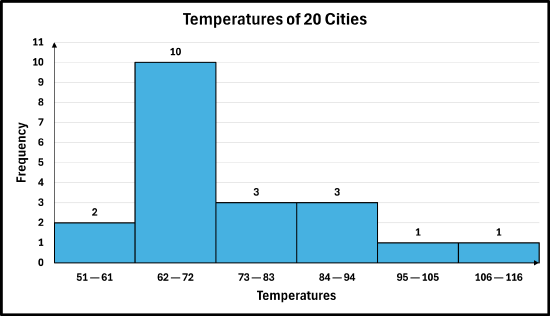
The histogram titled “Temperatures of 20 Cities” displays the frequency of city temperatures grouped into intervals. The x-axis is labeled “Temperatures,” and the y-axis is labeled “Frequency,” ranging from 0 to 11. The interval 51–61 degrees has a frequency of 2 cities. The interval 62–72 degrees has the highest frequency with 10 cities. The interval 73–83 degrees has a frequency of 3. The interval 84–94 degrees also has a frequency of 3. The interval 95–105 degrees has a frequency of 1. The interval 106–116 degrees has a frequency of 1. Overall, the histogram shows that most city temperatures fall between 62 and 72 degrees, while very high temperatures above 95 degrees occur much less frequently.
In a history class, the test scores (out of 100) for 30 students was recorded below in a grouped frequency distribution for the above data using a class width of 10 and a starting point of 60.
| Ratings | Frequency |
|---|---|
| 60—69 | 4 |
| 70—79 | 11 |
| 80—89 | 8 |
| 90—99 | 7 |
Draw a grouped frequency histogram for the data set.
✅ Solution:
- Step 1 — Obtain the data in a frequency distribution table: Here, the frequency distribution was given.
- Step 2 — Draw the histogram:
- Draw the axes: Draw a horizontal line for the x-axis and a vertical line for the y-axis.
- Label the axes: Label the horizontal axis with your chosen class width or bin intervals and the vertical axis with a frequency scale that accommodates your highest count. So, since the data is grouped, the first bin is labeled 60—69 and represents all data values that are between 60 and 69 inclusive. The second bin is labeled 70—79 and represents all data values that are between 70 and 79 inclusive. And so on, and so on.
- Draw the bars: For each class/bin, draw a vertical bar with a height corresponding to its frequency. The bars should have the exact same width and should touch each other to show the continuous nature of the data.
- Step 3 — Add a title, if necessary: Add the title, "History Test Scores" or some other similar title.
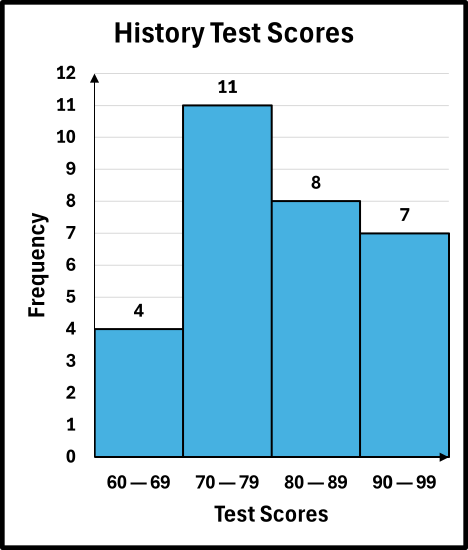
The histogram titled “History Test Scores” displays the frequency of student test scores grouped into four score intervals. The x-axis is labeled “Test Scores,” and the y-axis is labeled “Frequency,” ranging from 0 to 12. The score range 60–69 has a frequency of 4 students. The range 70–79 has the highest frequency with 11 students. The range 80–89 has a frequency of 8 students. The range 90–99 has a frequency of 7 students. Overall, the histogram shows that most students scored between 70 and 79, while fewer students scored in the 60–69 range.
The weight loss (in pounds) over 6 months for 32 program participants were recorded:
19, 18, 25, 15, 32, 20, 28, 14, 35, 22, 16, 30, 19, 38, 24, 17,
31, 21, 36, 23, 18, 29, 20, 34, 25, 16, 33, 22, 27, 12, 35, 26
Draw a grouped frequency histogram for the above data using a class width of 4 and a starting point of the lowest observation in the data set.
✅ Solution:
- Step 1 — Obtain the data in a grouped frequency distribution table: A grouped frequency distribution for the data set is given below. (See Section 6.2 for reference).
| Weight Loss (in pounds) | Frequency |
|---|---|
| 12—15 | 3 |
| 16—19 | 7 |
| 20—23 | 6 |
| 24—27 | 5 |
| 28—31 | 4 |
| 32—35 | 5 |
| 36—39 | 2 |
- Step 2 — Draw the histogram:
- Draw the axes: Draw a horizontal line for the x-axis and a vertical line for the y-axis.
- Label the axes: Label the horizontal axis with your chosen class width or bin intervals and the vertical axis with a frequency scale that accommodates your highest count. So, since the data is grouped, the first bin is labeled 12—15 and represents all data values that are between 12 and 15 inclusive. The second bin is labeled 16—19 and represents all data values that are between 16 and 19 inclusive. And so on, and so on.
- Draw the bars: For each class/bin, draw a vertical bar with a height corresponding to its frequency. The bars should have the exact same width and should touch each other to show the continuous nature of the data.
- Step 3 — Add a title, if necessary: Add the title, "Weight Loss" or some other similar title.

The histogram titled “Weight Loss” displays the frequency of weight loss amounts measured in pounds. The x-axis is labeled “Weight (in lbs)” and shows intervals from 12–15 pounds up to 36–39 pounds. The y-axis is labeled “Frequency” and ranges from 0 to 8. The interval 12–15 pounds has a frequency of 3. The interval 16–19 pounds has the highest frequency with 7. The interval 20–23 pounds has a frequency of 6. The interval 24–27 pounds has a frequency of 5. The interval 28–31 pounds has a frequency of 4. The interval 32–35 pounds has a frequency of 5. The interval 36–39 pounds has the lowest frequency with 2. Overall, the histogram shows that most weight loss amounts are between 16 and 35 pounds, with the greatest concentration occurring in the 16–19 pound range.
In statistics, there is an alternative way to draw a histogram that changes only how the x‑axis is labeled. Instead of placing a class label under each bar, the axis is marked with the class boundaries. This means each bar spans from the lower limit of a class up to, but not including, the upper limit. In this format, the sides of each bar line up exactly with the lower class limits, and every value falls into the interval that includes its lower boundary but excludes its upper boundary. Here is what the alternate histogram would look like for Example #6.7.6:
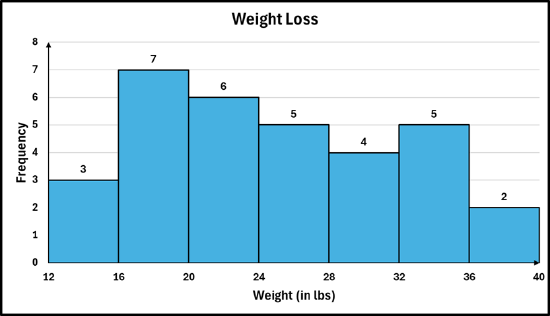
The histogram titled “Weight Loss” shows the distribution of weight loss amounts measured in pounds. The x-axis is labeled “Weight (in lbs)” and displays intervals from 12 to 40 pounds. The y-axis is labeled “Frequency” and ranges from 0 to 8. The interval 12–16 pounds has a frequency of 3. The interval 16–20 pounds has the highest frequency with 7. The interval 20–24 pounds has a frequency of 6. The interval 24–28 pounds has a frequency of 5. The interval 28–32 pounds has a frequency of 4. The interval 32–36 pounds has a frequency of 5. The interval 36–40 pounds has the lowest frequency with 2. Overall, the histogram shows that the most common weight loss amounts are between 16 and 24 pounds, while fewer individuals lost between 36 and 40 pounds.
So, the bin/bar between 12 and 16, represents the first class of 12—15, the second bin/bar between 16 and 20, represents the second class of 16—19, and so on. In the data set, there are two observations of 16, both of which would be counted in the second bin, not the first bin.
- Draw an ungrouped frequency histogram for the following data set: 1, 1, 2, 3, 4, 4, 4, 4, 5, 6, 6, 7, 7, 7, 7, 7, 7, 7, 9, 9
- Twenty AA batteries were tested to determine how long they would last. The results, to the nearest minute, were recorded as follows:
423, 369, 387, 411, 393, 399, 371, 377, 409, 392,
417, 431, 401, 363, 391, 405, 425, 400, 381, 399
The above data is in a grouped frequency distribution below using a class width of 9 and a starting point of 363.
| Minutes | Frequency |
|---|---|
| 363—371 | 3 |
| 372—380 | 1 |
| 381—389 | 2 |
| 390—398 | 3 |
| 399—407 | 5 |
| 408—416 | 2 |
| 417—425 | 3 |
| 426—434 | 1 |
Draw a grouped frequency histogram for the above data in the frequency distribution.
- The following data represent sales (in dollars) at a café during their slowest hour:
145, 152, 138, 160, 149, 176, 155, 142, 158, 151, 147, 181, 132, 154, 152, 168, 118, 175
Draw a grouped frequency histogram for the above data using a class width of 7 and a starting point of the lowest observation in the data set.
- Answers
-


